
AlonLearn / Webinars and live streaming
Webinars that actually hang together with the course.
Sign-up, broadcast, recording and certificate in the same system.
Stop exporting participant lists from Teams and uploading recordings to the intranet manually. AlonLearn is the webinar tool that knows who was registered, who was present long enough, and that issues the certificate automatically when the broadcast is over. Used by the Norwegian Nurses Organisation, DFØ and the County Governors — over 400,000 participants.
ONE PLATFORM
Vimeo Live + AlonLearn. One product for you.
Think of it as Teams with the broadcast itself — but connected straight to the certificate. Vimeo Live is the professional streaming engine behind it. AlonLearn is the learning platform that wraps the broadcast — sign-up, participant management, tracking and certificate. You don't log into two systems; it all happens in AlonLearn.
Sign-up
Form, payment, confirmations and reminders via email and SMS — all automatic.
AlonLearnLive studio and streaming
A professional live studio in the browser with chat, Q&A, polls and overlays — global CDN behind.
Vimeo LiveRecording and certificate
On-demand recording, attendance tracking and automated certificates based on viewing time.
AlonLearnHow it looks
From creation to recording.
The webinar is an activity in AlonLearn on a par with eLearning and physical courses. You create it, the participant signs up in the catalogue, and the recording is ready after the broadcast — all in the same interface.
Create the webinar activity
Choose "Video conference/webinar" as the activity type, set the date, capacity and sign-up rules. The rest — streaming link, recording, participant list — is wired up automatically.
Participants see and sign up
The webinar lands in the course catalogue alongside eLearning and physical courses. The participant sees the date, description, presenters and a button to sign up — all in the same interface.
Afterwards: recording, attendance, certificate
The recording is ready for those who signed up, attendance is tracked per participant, and the certificate is issued automatically for everyone who was on long enough.
LIVE STUDIO
How you run the broadcast
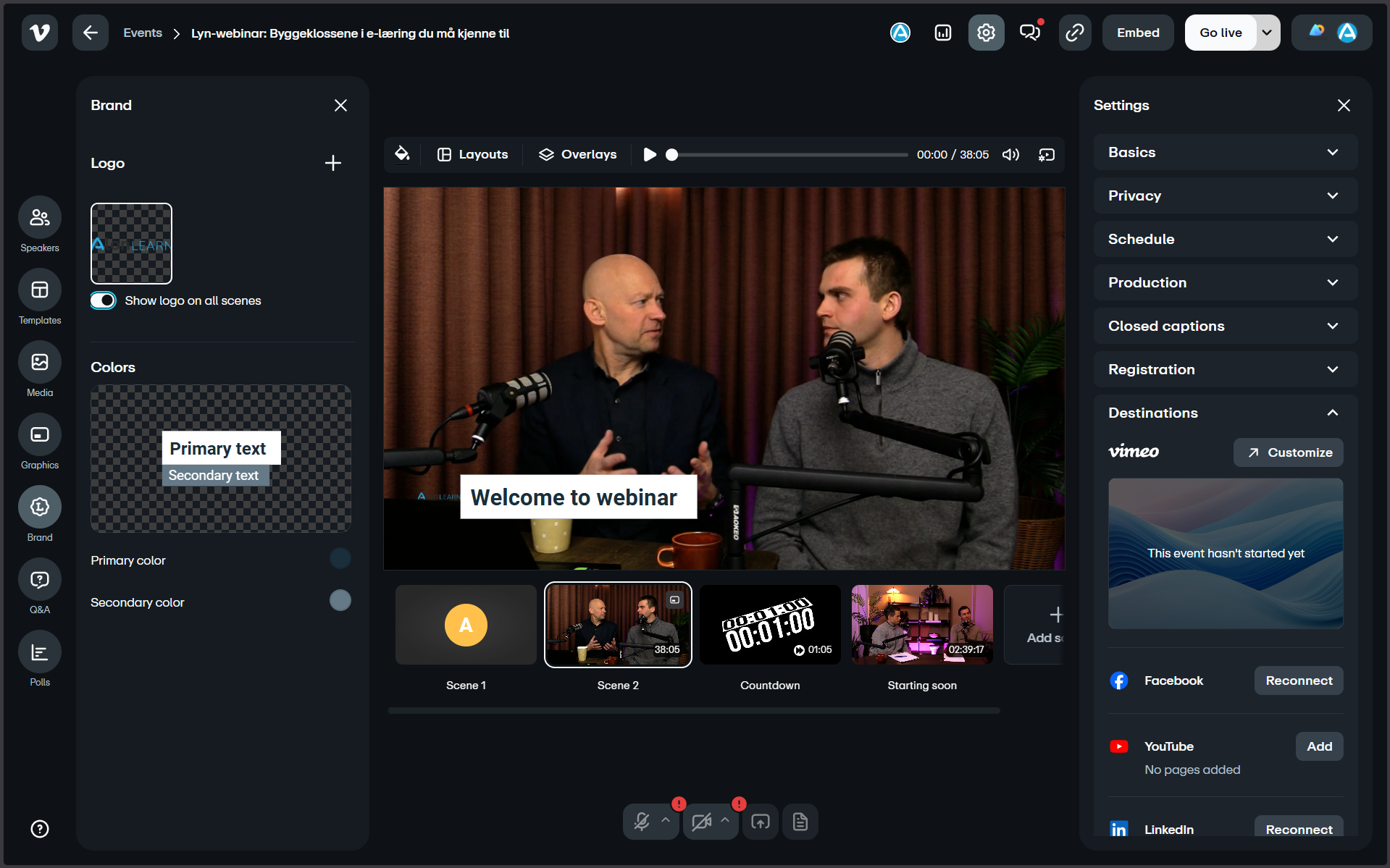
The Vimeo Live studio runs straight in the browser — multiple cameras, screen sharing, branding overlays, HD quality and automatic access control without extra production setup.
Live studio in the browser
The Vimeo Live studio runs straight in the browser — no software to install. Speaker, camera and screen sharing are set up in minutes.
Multiple presenters
Invite co-hosts, panellists or external guests. Switch between speakers live, show two speakers side by side or add screen sharing from any of them.
Overlays and branding
Logo, lower-thirds, titles and picture-in-picture — all overlaid live without external production. The webinar looks professional from the first second.
Screen sharing and slides
Share PowerPoint, Keynote, Figma, code or anything else. Slides can run alongside the speaker's camera, not as a cold cut.
HD quality, no lag
Vimeo Live delivers 1080p HD with adaptive bitrate — participants get smooth streaming regardless of network.
Scales with you
Streaming is distributed via Vimeo's global CDN. A small subject seminar and an open all-hands with thousands of viewers use the same setup — no need to plan infrastructure per broadcast.
Secure access
Automated access control ensures only registered participants can watch. No links floating around on Slack — only those signed up (or invited) get in.
Paid sign-up
Charge for the webinar with integrated payment via Stripe. Card payments, receipts and refunds happen automatically — no separate ticketing solution needed.
ENGAGEMENT
Keep participants active — not passive
Webinars lose attention fast if it's one-way communication. Chat, polls and Q&A are built into AlonLearn — no separate Mentimeter, Slido or Zoom add-ons.
Live chat
Participants talk to each other and the presenter while the broadcast is running. Moderation, pinned comments and pinning make the conversation manageable even at scale.
Polls and votes
Build polls in advance or spontaneously during the broadcast. The result is shown live on screen — a great way to break up longer webinars and keep attention up.
Q&A
A dedicated Q&A channel so subject questions don't drown in chat. Upvote popular questions, mark as answered, or pick them up afterwards.
Raise hand
Participants can request the floor and be let into the broadcast as a speaker. Perfect for panel debates, open Q&A or interview formats.
AFTER THE WEBINAR
Registrants, recording, tracking and certificate
The webinar doesn't end when the broadcast ends. The recording lives on with access control, attendance is measured per minute, and participants find the certificate on My page.
Sign-up and participant lists
Seamless sign-up connected to your AlonLearn courses, with automated confirmations and reminders via email and SMS. A full participant list is exported when you need it.
On-demand recording
The broadcast is recorded automatically and made available as an on-demand video to participants — or to new participants who signed up but couldn't make it live.
Access control on recordings
Decide who can watch the recording — and for how long. Restrict to registrants, organisations, paying customers or open it freely in the catalogue. Access can expire automatically after a set number of days.
Viewer analytics and engagement
Detailed analytics on attendance, engagement and viewing patterns — who was on live, how long they stayed, who watched the recording afterwards and how many dropped off along the way.
Certificate after webinar
Set a minimum attendance requirement and generate certificates automatically for those who meet it. The certificate lands on the participant's My page — ready for download.
Mix live and pre-recorded
Play pre-recorded segments in the middle of a live webinar — typical for intro videos, customer cases or interviews edited in advance. Seamless transition without technical fiddling.
WATCH US DO IT
Behind the scenes of a digital conference. The entire production in one tool.
In this webinar we show how a fully digital conference is set up in AlonLearn — from sign-up and programme, to the live studio, chat, polls and certificate after the broadcast. No extra Zoom, no extra Mentimeter — it all happens in the same system.
Already on Teams or Zoom — should you switch?
Get a short checklist by email: when it pays to keep Teams/Zoom, and when the manual follow-up work starts costing more than AlonLearn — no sales call.
Get the checklist by email →USE CASES
A webinar isn't one format — it's four
The same tool covers open marketing webinars, internal all-hands, hybrid gatherings and on-demand courses. You choose the format per broadcast.
Open webinars
Marketing webinars, launches and professional days open to anyone. Combine with Stripe for paid sign-up when relevant.
Internal broadcasts
All-hands, quarterly presentations and internal training — only visible to staff or members. SSO and audience targeting ensure the right audience.
Hybrid with physical gathering
Run a physical event and stream it simultaneously to those who can't attend. Shared participant list across hall and stream.
On-demand after broadcast
The webinar lives on as an on-demand course in the catalogue. New participants can watch the recording and still get a certificate based on completion time.
Want to share this page internally?
Get a 2-page overview of webinars and streaming in AlonLearn — as a PDF you can share with colleagues, communications or IT.
Get the 1-pager (PDF) by email →Integrations
Built on world-leading platforms.
Vimeo Live for the streaming itself, AlonLearn LMS as the wrapper around everything, Stripe for paid sign-up, SparkPost for invitation emails and Strex for SMS reminders — all seamlessly integrated.
BLENDED LEARNING
The webinar as one step in a larger learning path
Most organisations need more than a standalone webinar. AlonLearn lets you slot the webinar into a structured path that also includes self-study, physical gatherings and tasks — with a shared certificate.
Self-paced eLearning
SCORM courses participants take at their own pace — perfect preparation before a live webinar.
Live webinar
The broadcast via Vimeo Live is the interactive backbone — real-time dialogue, polls and Q&A.
Physical gatherings
Workshops or professional days as a complement to the webinar — happily streamed hybrid.
Shared certificate
Every format reports back to the same learning path and the same certificate.
GO DEEPER
The whole learning stack in AlonLearn.
Live webinar is one of several formats AlonLearn covers. Combine with eLearning, learning paths and physical courses to build complete journeys.
eLearning →
AI-generated SCORM courses participants take at their own pace — great preparation or follow-up to a live webinar.
Learning paths →
Combine webinars, eLearning and physical gatherings into structured paths with a shared certificate.
Physical courses → Coming soon
Workshops and professional days with sign-up and QR attendance — combine with live streaming for a hybrid format.