
AlonLearn / Learning paths
Onboarding isn't a library.
It's a recipe.
For HR leaders who need to show the board that new hires get a structured intro — and for subject leads who need to certify people in the right order. Learning paths put courses in sequence, track who is falling behind, and issue the certificate for the whole path when everything is done.
«A library of courses isn't the same as a recipe. New hires need an order — and a manager who sees who's falling behind — not a link to the course catalogue and a hope that they start in the right place.»
Learning paths in AlonLearn bring order, progress and the manager's report into the same system.
ONE WORKFLOW
From a jigsaw of PDFs to one structured path.
What HR leaders complain about most: PDFs on SharePoint, ad-hoc courses in an ancient LMS, a giant Excel to track who has taken what, and far too many manual reminders. AlonLearn brings the whole path into one interface — from building it to the certificate being issued.
Build the path
Pick courses from the catalogue, set the order, define prerequisites and completion criteria.
Replaces PDF folderSign-up
Enrol individuals, whole cohorts or import CSV — start date per participant.
Replaces tracking ExcelProgression
The participant takes activities in order; AlonLearn sends reminders when someone stalls.
Replaces manual emailsCertificate and report
A combined certificate is issued when the path is finished; the report goes to the manager and HR.
Replaces manual trackingHow it looks
From admin builder to the participant's My development.
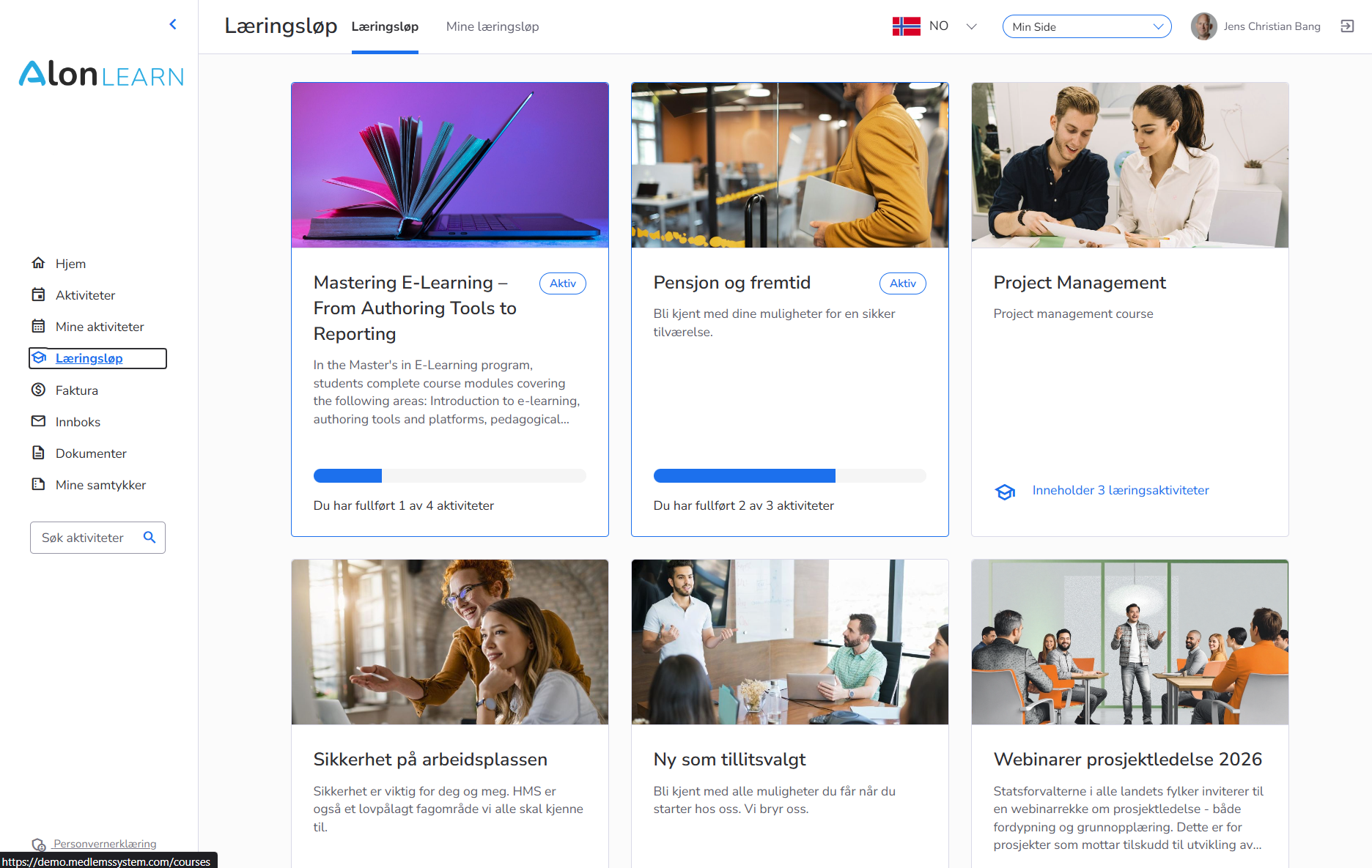
You build the path by picking courses and sorting them. The participant sees the whole path with a progress bar on My page. HR sees completion status per person — 1/4, 2/4, 4/4 — in the same interface.
Build the path
Choose a cover image, status (draft or published), add activities in the order you want and attach email templates to the path. Drag-and-drop sorting — change the order and new registrants immediately see the new sequence.
The participant's journey
The whole path is shown as a sorted list of activities with a progress bar — "You have completed 1 of 4". Each activity has its own cover image, status and "Go to activity" button. The next activity is clearly marked; completed ones are ticked off.
Who is falling behind?
The participant list shows "Completed activities" per person — 1/4, 2/4, 4/4 — in the same table as name, email, mobile and sign-up date. Filter on "less than halfway" and you have the list of who needs a follow-up chat.
BUILD THE PATH
Set the order once. Use the same path for every new hire.
The learning path is built as a sorted list of existing courses in the catalogue — you reuse what you already have and connect them in an order that makes sense. Change the order mid-year without breaking cohorts already in flight.
Set courses in sequence
Pick existing courses from the catalogue and slot them into the order the participant should take them. Drag-and-drop sorting — if you change the order in May, new participants in June see the new order automatically.
Prerequisites per activity
Activity 2 opens only when activity 1 is completed. Or open everything at once and let participants choose their own pace. Set the rule per path — strict certification paths are sequential, free-form professional content is open.
Mix formats in the same path
eLearning, webinar, physical gathering and tasks can sit side by side in the same learning path. A certification path can start with three SCORM courses, continue with a full-day gathering and finish with an exam — all administered in the same place.
One click signs you up for all activities
When the participant (or HR) signs up to the path, they're automatically enrolled in every activity in the right order. You don't do four separate sign-ups per employee. For paths with free eLearning and webinars this happens without manual steps; paid physical gatherings are invited as the activity opens in the path.
Edit without breaking cohorts in flight
Swap out a course in the onboarding path in March? New hires from March onwards get the new course. Existing hires already mid-path keep the original version — or are migrated on your command.
Cover image and description
Every path has its own cover image, description and short subject info — shown in the catalogue so the participant understands what the path is about before clicking "sign up".
THE PARTICIPANT'S JOURNEY
My development — 'You have completed 2 of 4'
The participant sees the whole path with clear progress on My page. The next activity is marked; completed ones are ticked off; reminders are sent automatically if progress stalls. Works on the phone so onboarding can start before the first working day.
My development — one path, every activity
The participant sees the whole path on My page with a progress bar — "You have completed 2 of 4 activities". The next activity is clearly marked. No searching the catalogue to find the next step.
Next module opens when the previous is done
On sequential paths, the next activity opens automatically when the previous is completed. The participant gets an email: "Activity 3 of 4 is ready for you". No more "when does the next part come?" questions.
Reminders for stalled activities
Has the participant stopped halfway through the path for two weeks? Automatic reminder via email — or SMS via Strex if it's urgent. You edit the text, AlonLearn sends — and the reminder stops when the participant completes.
Works on the phone
The entire learning path — from sign-up via completion to certificate — works in the browser on mobile. New hires take the onboarding course on the train between interview and first day, without downloading a single app.
Certificate for the whole path
When all activities are completed, one combined certificate is issued for the entire path — in addition to (or instead of) certificates per sub-course. You choose whether both are issued or just the combined one.
Go back and revisit
Completed eLearning stays available for revisits — even after the whole path is done. Certified professionals can come back and refresh without re-enrolling.
«The most expensive part of onboarding isn't the courses. It's the three months a new hire moves at half speed because nobody knows how far they\'ve got — and the manager only spots the gap in the competence matrix when she\'s supposed to do something on her own.»
Learning paths give you completion rate per cohort — in time to do something about it.
FOR HR AND LEADERSHIP
Who is falling behind on the onboarding path?
The participant list shows 'Completed activities' per person. Filter on 'less than halfway after 30 days', export to Excel for the competence matrix, or let the department manager follow their own team. Roles per organisational unit — HR director sees everyone, department manager sees their own.
Who is falling behind?
The participant list shows "Completed activities" per person — 1/4, 2/4, 4/4. Filter on "less than halfway after 30 days" and you have the list of new hires who need a follow-up chat with their manager.
Cohort sign-up
Sign up a whole department or cohort in one click — or import a CSV from your HR system. Each new hire gets their own onboarding path with a start date equal to their hire date.
Time-controlled paths
Set a start date per participant — the onboarding path starts the day the new hire begins, not the day you create them in the system. Quarterly competence modules open on a fixed date for the whole cohort at once.
Completion rate per cohort
Compare the onboarding path for new hires in Q1 against Q2 — what share completed within 60 days, which activities had the longest stalls, where people dropped off. Concrete board reporting, not gut feeling.
Export to competence matrix
The whole participant list with completion status per activity exports to Excel in one click — for the competence matrix, quality manager or auditor. Everything on the same row: name, email, start date, completed when.
Managers see only their own
Department managers get access to completion status for their own team — not the whole organisation. Roles per organisational unit, so the HR director sees everyone and the department manager sees only their own.
12 things an onboarding path should contain — how many do you have in place?
Get a short checklist by email: 12 typical activities in a good onboarding path (from HSE and GDPR to the 90-day chat), when in the path they should sit, and which are typically forgotten. Concrete, not generic — no sales call.
Get the checklist by email →USE CASES
Three ways Norwegian organisations use learning paths
Same tool, three completely different usage patterns. Onboarding is about structure in the first 90 days; certification about controlled progression with an exam at the end; competence development about rhythm over time.
Onboarding for new hires
Welcome course, HSE, GDPR, code of conduct, IT security, professional intro and a concluding chat with the manager — all in one path that starts day one and finishes after 90 days. The manager sees who is across the line before probation runs out.
Certification path for professionals
Three mandatory eLearning courses, a professional day and a passed exam — in sequential order. The certificate is issued when everything is done, with an expiry date two years out. Recertification is triggered automatically as the date approaches.
Continuing competence development
A professional track for the finance department that opens one module per quarter — Q1 accounting, Q2 budgeting, Q3 reporting, Q4 close. Participants follow their own pace between modules but keep the same rhythm as the cohort.
Want to share this page internally?
Get a 2-page overview of learning paths in AlonLearn — as a PDF you can share with the HR director, subject lead or board before you pick a solution for onboarding or certification.
Get the 1-pager (PDF) by email →Integrations
Connects to the tools you already use.
Entra ID for SSO so staff log in with their work account, SCORM Cloud for eLearning tracking, Vimeo Live for streamed webinars, SparkPost for email reminders and Strex for SMS when someone falls behind — all seamlessly integrated.
BLENDED LEARNING
eLearning, webinar and physical gathering in the same path
Learning paths are where the formats meet. Pre-reading via SCORM, a subject session in a physical room with QR check-in, post-event webinar — every activity type is administered in the same place, and a completed activity counts equally in the progress bar regardless of format.
eLearning
SCORM courses tracked in real time — built from scratch in AlonLearn's authoring tool or imported as ready-made packages.
Webinar and streaming
Live broadcasts via Vimeo Live placed inside the path — attendance time is measured and added as a completed activity.
Physical courses
Subject sessions with QR check-in on the day — attendance counts as a completed activity in the learning path automatically.
Congress and conference
The conference is slotted in as one step — pre-reading via eLearning, the physical conference, post-event evaluation, all in the same path.
GO DEEPER
The whole learning stack in AlonLearn.
Learning paths tie the courses together. Course administration is the framework they live in. eLearning is the content that fills them. Reports tell you what actually happened. Explore the other parts here.
Course administration →
The general framework for courses, participants, certificates and reports — learning paths build on this and connect the courses in sequence.
eLearning →
AI-generated SCORM courses become the building blocks of the learning path — build the content in AlonLearn's authoring tool and add the courses to the path with one click.
Reports → Coming soon
Completion rate, attendance log and competence matrix across all paths and courses — export to the board or auditor the same day.